Microsoft Entra

Connector Details
| Name | Microsoft Entra |
|---|---|
| Description | Microsoft Entra is a comprehensive identity and access management (IAM) solution designed to securely manage access to resources across a range of environments, including on-premises, cloud, and hybrid setups. It combines Azure Active Directory (Azure AD) with advanced identity governance, entitlement management, and decentralized identity capabilities to provide a unified platform for managing identities and permissions. Entra enhances security by offering features like conditional access, multi-factor authentication (MFA), and identity protection, making it an essential tool for organizations looking to safeguard their digital assets while ensuring seamless user experiences. |
| Connector Type | Class B |

Features
| Load Strategies | Full Load, Incremental Load |
|---|---|
| Metadata Extraction | Supported |
| Data Acquisition | Supported |
| Data Publishing | Not Supported |
| Automated Schema Drift Handling | Not Supported |

Source Connection Attributes
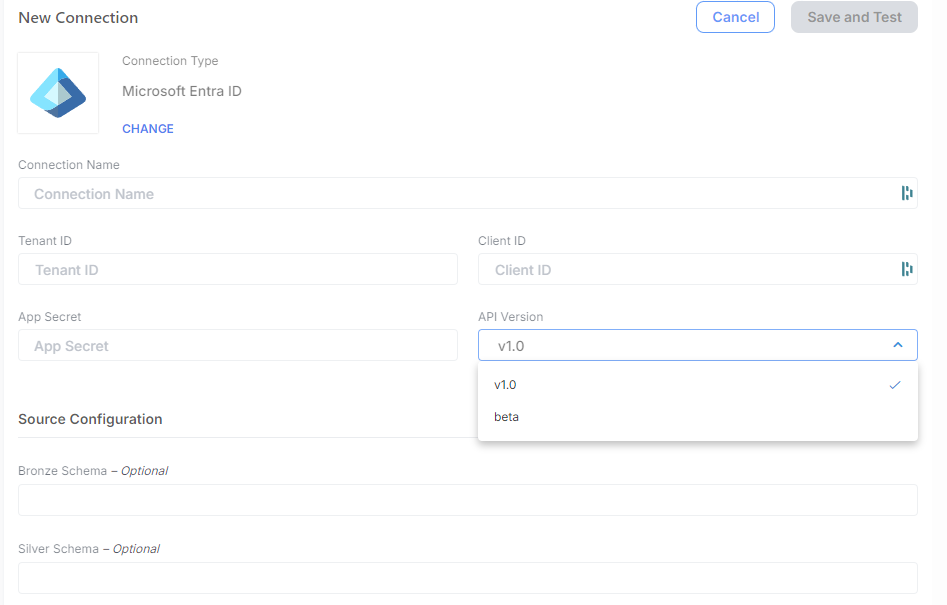
| Connection Parameters | Data Type | Example |
|---|---|---|
| Client ID | String (GUID) | 60a062ab-8f8b-401b-85a9-20ca617e3bc3 |
| Tenant ID | String (GUID) | 2bcd81c5-12cc-4a03-866f-831daedd6555 |
| App Secret | String | |
| API Version | String | Options are "v1.0" or "beta". Default and recommend value is "v1.0", as it is more stable. It is not recommended to use "beta" as that API version can change often. |
| Bronze Schema (Optional) | String | |
| Silver Schema (Optional) | String |

Connector Specific Configuration Details
-
Microsoft Entra ID connector has optional values such as Bronze Schema and Silver Schema
-
Register a new Application in Microsoft Entra Id called "Empower Entra Data Extraction Connector"
- Steps on how to register an application. Get access without a user - Microsoft Graph
- Leave Redirect URI blank for now.
-
Assign App API permissions.
- For Instructions on how to assign Graph API permissions, see the following link Configure permissions for Microsoft Graph
- For specific permissions required for the Empower Entra ID Connector, see the section below Graph API Permissions Requirements .
-
Request administrator consent—allof the API endpoints will require administrator consent to grant access to the app.
-
Connection details are can be found in Entra ID App Registration for the app created in step#2:
Client ID: This represents the Application (client) ID for your registered application in your Azure Tenant.Tenant ID: This represents the tenant ID for your Azure Tenant.App Secret: This is the Client Credentials Secret for the registered application in Azure Entra ID App Registration.API Version: Options are "v1.0" and "beta", it is recommended to use "v1.0" as it is more stable. -
Refer the public documentation for more details around this source: Public API documentation

Screenshot To Use Connector